The Scenario
Today is Alice’s first day at the Wayne Enterprises Security Operations Center (SOC). Lucius Fox has just dropped a memo from the Gotham City Police Department (GCPD) on her desk.
The Intel: Evidence found on Pastebin suggests that www.imreallynotbatman.com—hosted on Wayne Enterprises’ infrastructure—has been compromised by the Po1s0n1vy APT group. Their goal? Defacement and embarrassment.
Your mission is to validate the compromise, trace the attack vector, and reconstruct the timeline using Splunk.
Phase 1: The Setup (Filtering the Noise)
Before hunting, we need to focus our lens. In a real-world SOC, you are swimming in millions of logs. We need to isolate the relevant data.
Step 1: Select the Index
We start by listing all available indexes to find our target:
[!NOTE] What is an Index?
According to Splunk documentation, an index is the “repository for data” where processed logs are stored; identifying available indexes (e.g., index=botsv1) is the critical first step to narrow your search scope and ensure you are hunting in the correct dataset.
| eventcount summarize=false index=*
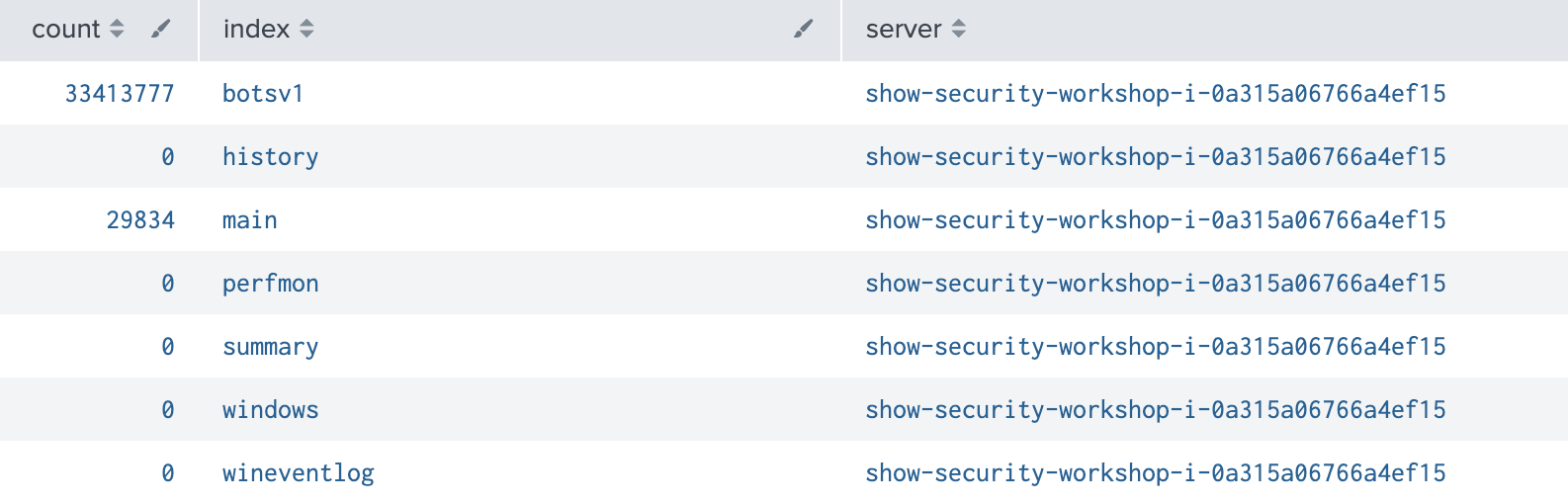
We start by querying the botsv1 index to confirm data flow.
index=botsv1
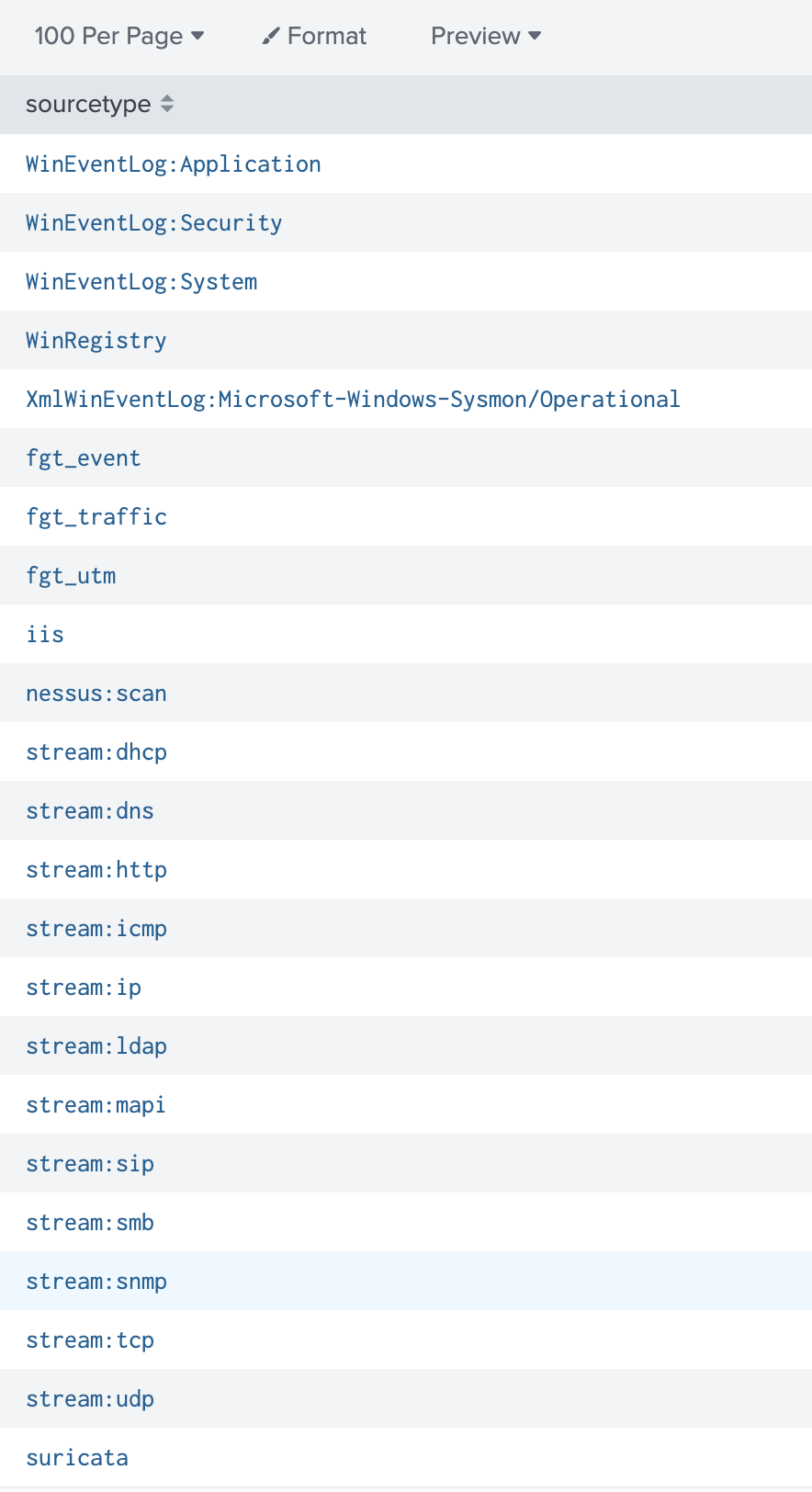
Once we know the index, we need to know what kind of data is inside it. This is where Sourcetypes come in.
[!NOTE] What is a Sourcetype?
According to Splunk documentation, a sourcetype determines “how Splunk software formats the incoming data.” From a Red Team perspective, this list acts as a map of the defender’s visibility—revealing exactly what technologies (Firewalls, Web Servers, OS Logs) are being monitored.
We run the following to list the data streams:
| metadata type=sourcetypes | fields sourcetype
Step 2: Isolate the Target
We filter specifically for traffic related to the victim domain.
index="botsv1" "imreallynotbatman.com"
Step 3: Focus on HTTP Streams
To understand web attacks, we need to look at the web traffic. We filter by sourcetype=stream:http
index="botsv1" "imreallynotbatman.com" sourcetype="stream:http"
Phase 2: Reconnaissance & Scanning
The attacker always knocks before entering. We are looking for the “loud” noise of a vulnerability scanner.
Q1: The Scanner IP
Objective: Identify the IP address performing vulnerability scans.
We analyze the Source IPs (src_ip) hitting our web server. A scanner will generate a disproportionately high number of connections.
index="botsv1" imreallynotbatman.com sourcetype="stream:http"
| top limit=20 src_ip
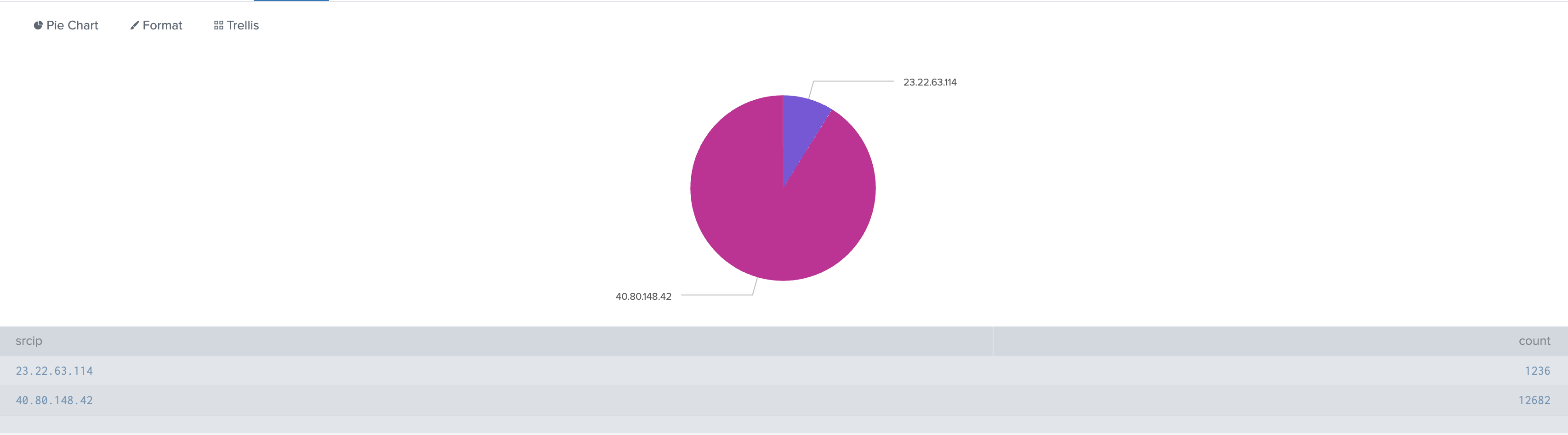
We see two main actors: 40.80.148.42 and 23.22.63.114. However, 40.80.148.42 is generating the volume associated with scanning activity. Looking at the blocked events, one IP address stands out immediately: 40.80.148.42. This is our primary suspect.
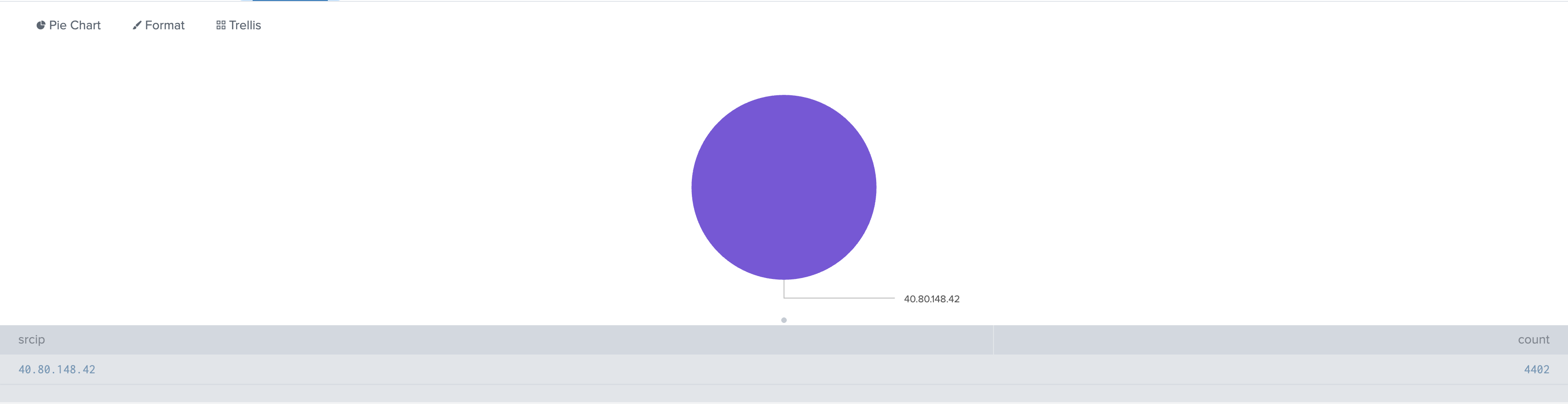
Answer: 40.80.148.42
Q2: The Scanning Tool
Objective: Determine which tool the attacker used.
If we open the details related to any event that was blocked, we can see the attack ID and the specific attack that took place.
index="botsv1" sourcetype=fgt* "imreallynotbatman.com" action="blocked"| stats count BY srcip,attack | sort -u | head 10

The IDS flags the traffic explicitly as Acunetix.
Answer: Acunetix
Q3: The Target CMS
Objective: Identify the Content Management System (CMS) running on the victim site.
Attackers fingerprint the CMS to select the right exploits. We can see this in the URIs being accessed.
index="botsv1" sourcetype=stream:http imreallynotbatman.com
| top limit=20 uri
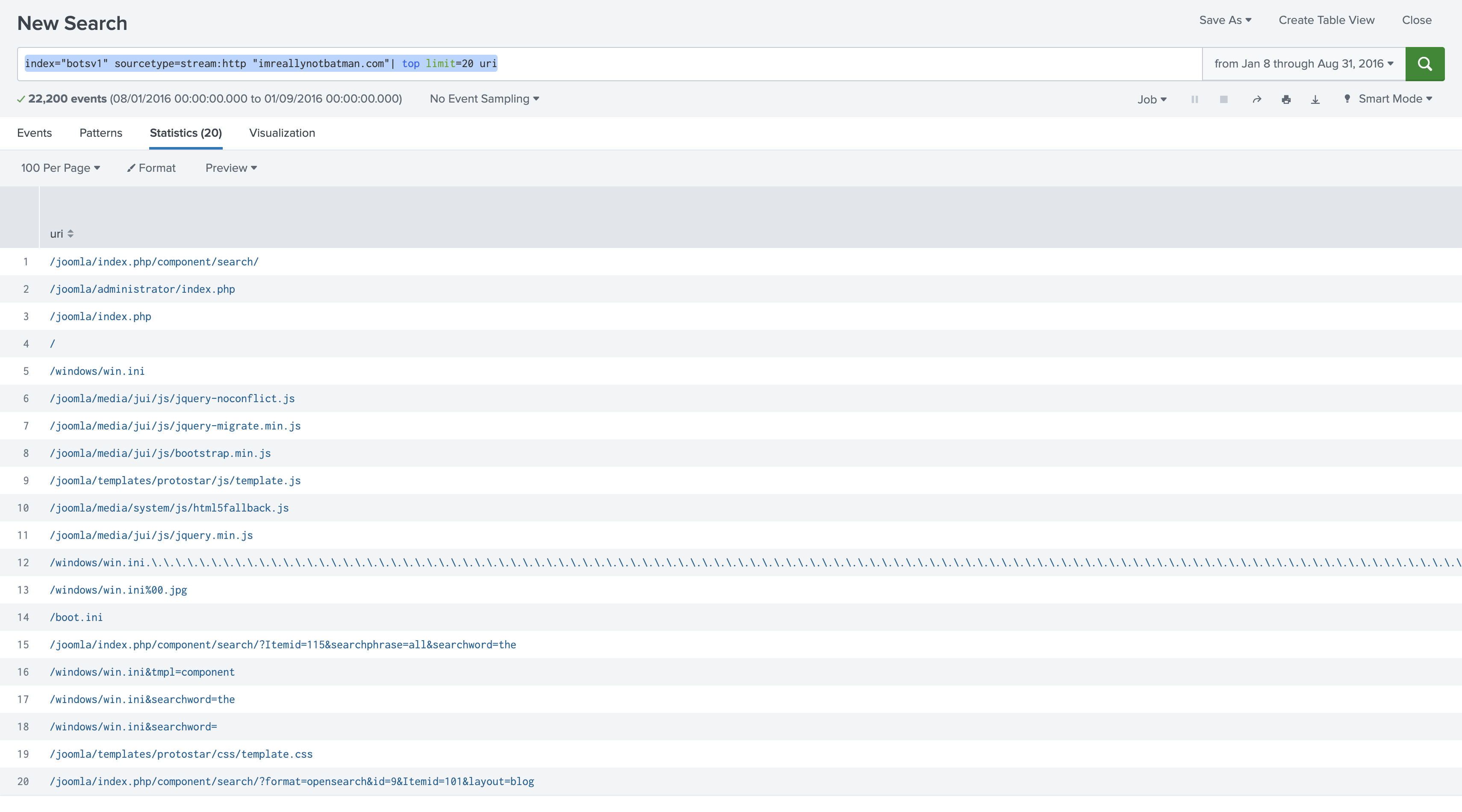
The repeated presence of /joomla/ directories confirms the technology stack.
Answer: Joomla
Phase 3: Defacement & Infrastructure
The attacker moved from scanning to exploitation.
Q4: The Defacement File
Objective: Identify the specific file used to deface the website.
The goal was to embarrass Wayne Enterprises. We search for image files (.jpeg, .png) downloaded or uploaded during the attack window.
index="botsv1" sourcetype=stream:http src_ip="23.22.63.114"
| table site src_headers
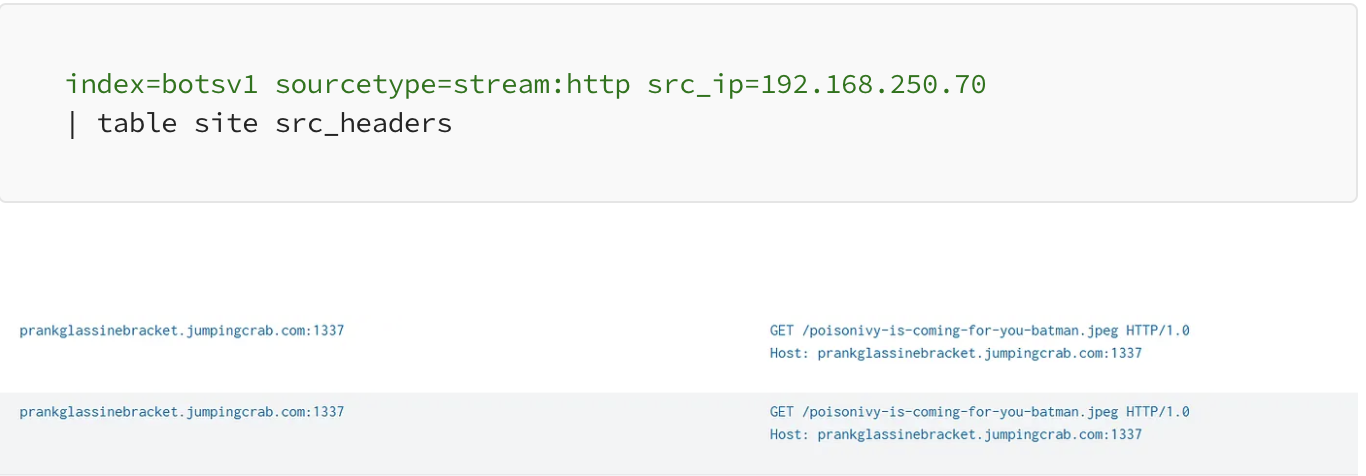
We find a file with a taunting name: poisonivy-is-coming-for-you-batman.jpeg.
Answer: poisonivy-is-coming-for-you-batman.jpeg
Q5: Dynamic DNS
Objective: Identify the malicious FQDN.
By analyzing the site or host headers associated with the attacker’s IP, we discover they used Dynamic DNS to mask their infrastructure. (We found the answer on Q4.)
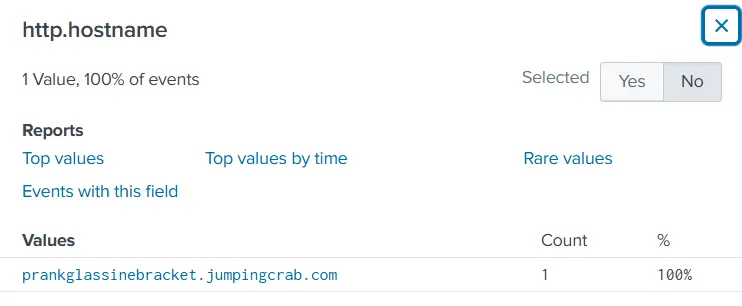
Answer: prankglassinebracket.jumpingcrab.com
Q6: The Staging IP
Objective: Identify the IP pre-staged for the attack.
While 40.80.148.42 did the scanning, investigation (and Open Source Threat Intelligence via VirusTotal) reveals that 23.22.63.114 is the IP associated with the Po1s0n1vy infrastructure and the defacement file.
https://otx.alienvault.com/indicator/ip/23.22.63.114
Answer: 23.22.63.114
Phase 4: The Brute Force Attack
Now we analyze how they got in. The second IP (23.22.63.114) launched a brute force attack against the Joomla login panel.
Q7: The Brute Force IP
Objective: Confirm the IP executing the brute force.
First, we can use the Fortinet firewall logs to check how many unique source IPs we have.
index="botsv1" sourcetype=fgt* "imreallynotbatman.com" | stats count by srcip
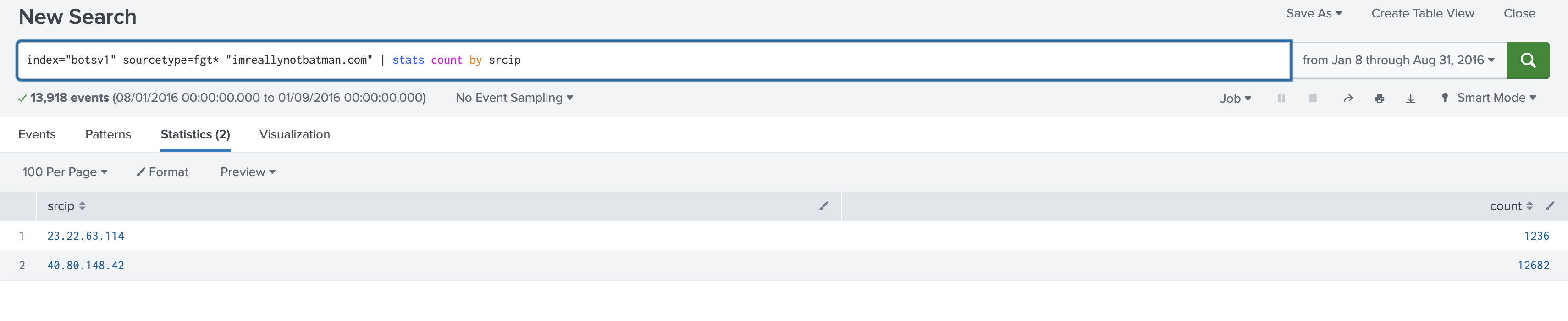
Let’s investigate what this new IP address is doing.We can see every occurrence of this IP address by using the following command.
index="botsv1" sourcetype=* "imreallynotbatman.com" "23.22.63.114"
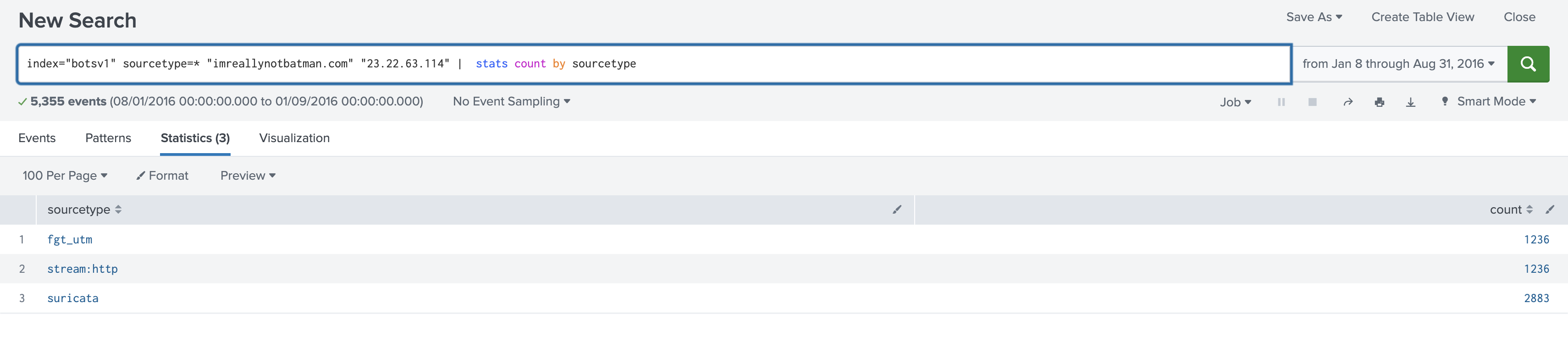
Now that we know when this IP address appeared, let’s see exactly where it made requests.
index="botsv1" sourcetype=* "imreallynotbatman.com" "23.22.63.114" | stats count by uri
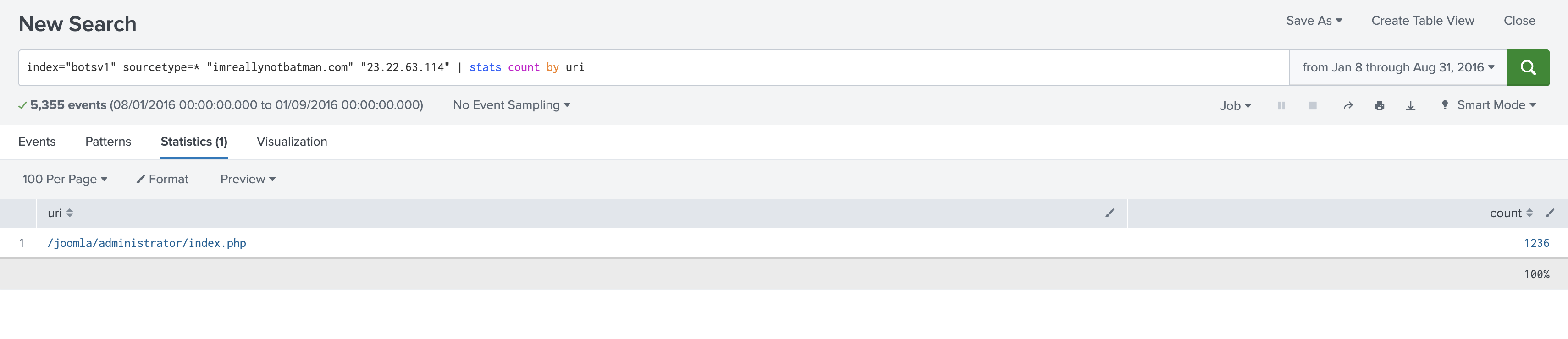
Apparently, 100% of the requests are targeting the URI /joomla/administrator/index.php. his is a clear sign of a brute force attack, and it reveals that the attacker used a different server (23.22.63.114) for this specific task.
We can verify this finding with the following query as well.
index="botsv1" sourcetype=* "imreallynotbatman.com" "23.22.63.114" uri="/joomla/administrator/index.php"| stats count by form_data

Answer: 23.22.63.114
Q8: The Malicious Executable
Objective: Identify the executable uploaded after the breach.
Once they brute-forced the login, they uploaded a backdoor. We look for .exe files in the POST data.
Since we know this is a Windows machine and the attackers gained access as the Joomla administrator, we can check if they uploaded any malicious executables.
index="botsv1" sourcetype=* "imreallynotbatman.com" AND "*.exe"
This query returns 83 events. The only way to upload an executable is by using the HTTP POST method. This filter helps us reduce the number of events to 7, so let’s continue the investigation.
index="botsv1" sourcetype=* "imreallynotbatman.com" AND "*.exe" http_method=POST
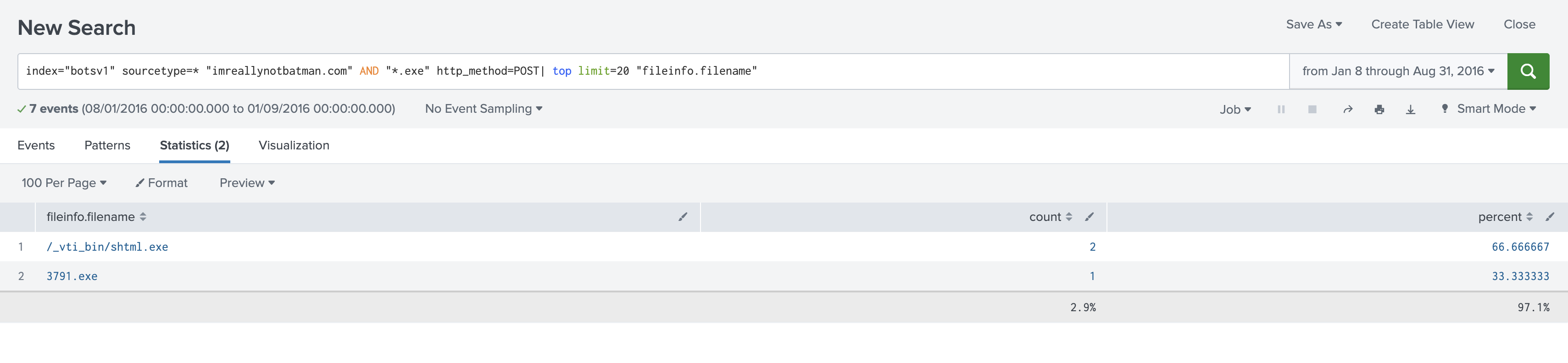
The filename ‘3791.exe’ looks interesting, so let’s search for it across the server.
index="botsv1" sourcetype=* "imreallynotbatman.com" "3791.exe"| top limit=20 sourcetype
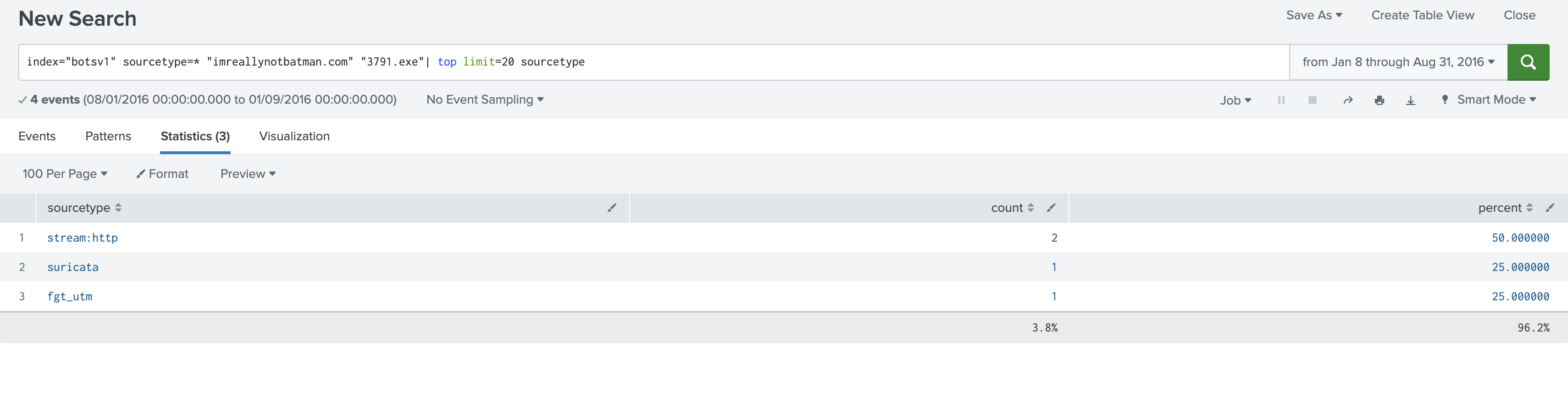 We can see there are logs from
 fgt_utm (FortiGate Unified Threat Management).
index="botsv1" sourcetype=* "imreallynotbatman.com" "3791.exe" sourcetype=fgt_utm | table file_name,file_hash,url,dtype,msg,subtype,severity
There is a single event with the message msg='File is infected'.This provides us with all the important information about the file.
Answer: 3791.exe
Q9: The Malware Hash
Objective: Find the MD5 hash of the uploaded executable.
To get the hash, we pivot to Sysmon or Fortinet logs, which record file hashes during execution or transmission.
index="botsv1" sourcetype=* "imreallynotbatman.com" "3791.exe" sourcetype=fgt_utm | table file_name,file_hash,url,dtype,msg,subtype,severity

Lets search for the file hash else where.
index="botsv1" sourcetype=* "ec78c938d8453739ca2a370b9c275971ec46caf6e479de2b2d04e97cc47fa45d"
Apparently, a similar hash was found in the XmlWinEventLog:Microsoft-Windows-Sysmon/Operational source, in addition to the fgt_utm sourcetype. In the hashes field of the event, we can see the MD5 hash.
Answer: aae3f5a29935e6abcc2c2754d12a9af0
Phase 5: Threat Intelligence (OSINT)
Note: In the BOTS scenario, these questions involve using external OSINT tools like VirusTotal based on the IPs/Hashes found above.
Q10: Phishing Malware
Objective: GCPD reported that common TTPs (Tactics, Techniques, Procedures) for the Po1s0n1vy APT group, if initial compromise fails, is to send a spear phishing email with custom malware attached to their intended target. This malware is usually connected to Po1s0n1vys initial attack infrastructure. Using research techniques, provide the SHA256 hash of this malware.
We can use VirusTotal to identify the domains related to “23.22.63.114”. If we scroll down the page, we see three malware files in the “Communicating files” tab.

Let’s click on MirandaTateScreensaver.scr.exe and view the details.
Answer: 9709473ab351387aab9e816eff3910b9f28a7a70202e250ed46dba8f820f34a8
Q11: The Hex Code
Objective: Identify the special hex code in the customized malware.
On VirusTotal, under the Community Tab, we can find a hex code associated with the malware. This hex code can provide additional insights into the nature of the file, allowing us to identify the executable more accurately. By analyzing this hex code, we can potentially confirm whether the file is indeed malicious and gather more details for further investigation.
Answer: 53 74 65 76 65 20 42 72 61 6e 74 27 73 20 42 65 61 72 64 20 69 73 20 61 20 70 6f 77 65 72 66 75 6c 20 74 68 69 6e 67 2e 20 46 69 6e 64 20 74 68 69 73 20 6d 65 73 73 61 67 65 20 61 6e 64 20 61 73 6b 20 68 69 6d 20 74 6f 20 62 75 79 20 79 6f 75 20 61 20 62 65 65 72 21 21 21
Phase 6: Deep Dive - Password Analysis
We are now going to dissect the brute force attack packet-by-packet to reconstruct the attacker’s dictionary.
Q12: The First Password
Objective: What was the first password attempted?
We use Regex (rex) to extract the passwd field from the form data and sort by time.
index=botsv1 sourcetype=stream:http dest_ip="192.168.250.70" http_method=POST uri=/joomla/administrator/index.php
| rex field=form_data "passwd=(?<password>\w+)"
| sort _time
| head 1
| table _time, password
Answer: 12345678
Q13: The Coldplay Song
Objective: Find a 6-character password that matches a Coldplay song.
index="botsv1" sourcetype=*  "imreallynotbatman.com"  uri="/joomla/administrator/index.php" form_data="*&passwd*"
| rex field=form_data "passwd=(?<Password>\w+)"
| rex field=form_data "username=(?<Username>\w+)"
| eval Length = len(Password)
| search Length=6
| table _time,Username, Password, Length
Answer: yellow
Q14: The Correct Password
Objective: Which password granted access?
We look for the password that resulted in a successful login (or was used multiple times, indicating a session was established).
Code snippet
... | rex field=form_data "passwd=(?<password>\w+)"
| search password="batman"
| stats count by password
Answer: batman
Q15: Average Password Length
Objective: Calculate the average length of attempted passwords.
Code snippet
index="botsv1" sourcetype=*  "imreallynotbatman.com"  uri="/joomla/administrator/index.php" form_data="*&passwd*"
| rex field=form_data "passwd=(?<Password>\w+)"
| rex field=form_data "username=(?<Username>\w+)"
| eval Length = len(Password)
| stats avg(Length)
Answer: 6
Q16: Time to Compromise
Objective: How much time elapsed between the brute force starting and the correct password being found?
We use the transaction command to calculate the duration.
Code snippet
index="botsv1" sourcetype=*  "imreallynotbatman.com" uri="/joomla/administrator/index.php" form_data="*&passwd*"
| rex field=form_data "passwd=(?<Password>\w+)"
| rex field=form_data "username=(?<Username>\w+)"
| search Password=batman
| table _time,Username, Password
| transaction Password
Answer: 92.17 seconds
Q17: Unique Passwords
Objective: How many unique passwords were tried?
Code snippet
index="botsv1" sourcetype=*  "imreallynotbatman.com" uri="/joomla/administrator/index.php" form_data="*&passwd*"
| rex field=form_data "passwd=(?<Password>\w+)"
| rex field=form_data "username=(?<Username>\w+)"
| table _time,Username, Password
| dedup Password
| stats count by Password
| stats sum(count) as count
Answer: 412
Conclusion: Case Closed
By correlating data from firewalls, IDS, and endpoint sensors, we successfully reconstructed the Po1s0n1vy attack lifecycle. We traced the adversary from their initial vulnerability scan (40.80.148.42) and brute-force attack (23.22.63.114) to the moment they compromised the Joomla admin panel with the password batman. Finally, we identified the delivery of their malicious payload, 3791.exe, and its corresponding MD5 hash.
This investigation proves that while an attacker only needs to find one weakness, a prepared defender with centralized visibility in Splunk can pull a single thread to unravel the entire operation. Gotham is safe—for now.